

Most RAG (retrieval-augmented generation) tutorials in 2024-2025 assumed you’d ship documents to OpenAI for embeddings, store the vectors in Pinecone or Weaviate, and call GPT-4 for generation. By 2026 the on-prem story has gotten dramatically better: Postgres with pgvector is fast enough for most workloads, the open-weight LLMs (Llama 3.x, Qwen, Mistral) are good enough for most generation tasks, and you can run the entire pipeline on your own hardware without sending a single token to an external API. This article walks through what that actually looks like, with a real query against pgvector running in docker.
Why on-prem RAG is now viable
The case for on-prem RAG has always existed — data sovereignty, privacy compliance, cost control, the absence of a per-token bill — but the tooling had to catch up. The pieces that fell into place during 2024-2025:
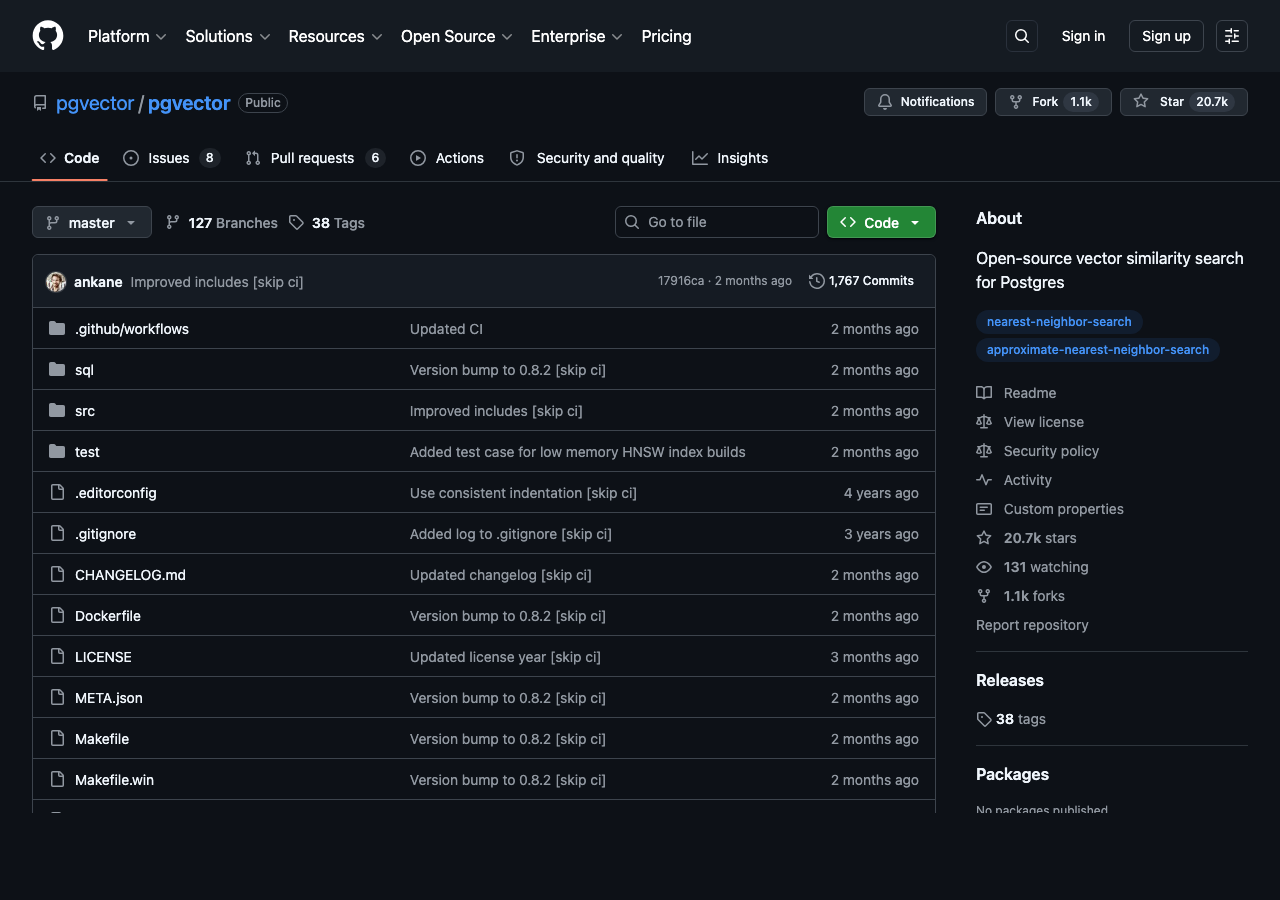
- pgvector matured. The Postgres extension that adds vector data types and similarity search went from a hobbyist project to a production-grade option used by companies like Heroku and Supabase. Index types (HNSW and IVFFlat) are well-tuned, the SQL syntax for similarity queries is simple, and the performance on millions-of-vectors workloads is competitive with dedicated vector databases.
- Open-weight LLMs got good enough. Llama 3.1 70B is broadly competitive with GPT-3.5 on most general tasks and handles English-language RAG generation cleanly. Llama 3.2 and the smaller 8B variants run on a single consumer GPU. Qwen 2.5 and Mistral Small are competitive alternatives. None of these match GPT-4 on hard reasoning, but RAG generation isn’t a hard reasoning task — it’s reformulating retrieved text into a natural-language answer, and the open models do this well enough that most users can’t tell the difference in blind testing.
- Embedding models followed. The BGE family from BAAI, the E5 series from Microsoft, and the nomic-embed-text models all run locally and produce embeddings that are competitive with OpenAI’s text-embedding-3-small for most domains. The on-prem embedding story is no longer the bottleneck.
- Inference servers caught up. vLLM, llama.cpp, and Ollama all let you serve open-weight LLMs through OpenAI-compatible APIs, so application code that was written against the OpenAI Python client mostly Just Works against a local server with an environment variable change.
The reference architecture
The minimum viable on-prem RAG pipeline has four pieces:
- An embedding model (running on your hardware) that turns text into vectors.
- A vector store (pgvector) that stores the vectors next to the original document text.
- A retrieval step that takes a user query, embeds it, and finds the K nearest documents.
- A generation step that prompts an LLM with the user query and the retrieved documents and asks it to compose an answer.
Everything except the LLM generation can be done with a few hundred lines of Python plus pgvector. The LLM generation is the part that needs serious GPU resources for a 70B model — 1xA100-80GB or 2xA100-40GB at fp16, less if you accept quantization. For an 8B model, a single consumer card (RTX 4090, 3090, or even 4070Ti Super) is enough.
Setting up pgvector
The fastest way to get pgvector running is the official docker image:
docker run -d --name pgvector \
  -e POSTGRES_PASSWORD=mysecret \
  -p 5432:5432 \
  pgvector/pgvector:pg16
This gives you a Postgres 16 server with the pgvector extension preloaded. Connect to it and create the extension and your table:
CREATE EXTENSION vector;

CREATE TABLE docs (
  id serial PRIMARY KEY,
  content text,
  metadata jsonb,
  embedding vector(1024)  -- size matches your embedding model
);

CREATE INDEX ON docs USING hnsw (embedding vector_cosine_ops);
The HNSW index is the right default for similarity search at 100k+ vectors. Below 10k vectors a flat scan is competitive with the index. Above a million vectors the index is essential.
Embedding documents
Pick an embedding model and stick with it across your entire corpus. Mixing embedding models is the most common bug in RAG pipelines — embeddings from different models live in different vector spaces and similarity scores between them are meaningless. The popular open-weight choices in 2026:
- BAAI/bge-large-en-v1.5 — 1024-dimension, English-only, strong general-purpose. Solid default.
- nomic-ai/nomic-embed-text-v1.5 — 768-dimension, English, slightly worse on benchmarks but smaller and faster.
- mixedbread-ai/mxbai-embed-large-v1 — 1024-dimension, often outperforms bge-large on retrieval benchmarks despite being newer.
- intfloat/multilingual-e5-large — 1024-dimension, supports 100+ languages, the right choice if your corpus isn’t English-only.
Run the embedding model with sentence-transformers in Python:
from sentence_transformers import SentenceTransformer
import psycopg2

model = SentenceTransformer('BAAI/bge-large-en-v1.5')

docs = ["Postgres is a relational database", "Cats are popular pets", ...]
embeddings = model.encode(docs, normalize_embeddings=True)

conn = psycopg2.connect(host='localhost', dbname='rag', user='postgres', password='mysecret')
with conn.cursor() as cur:
    for content, vec in zip(docs, embeddings):
        cur.execute(
            "INSERT INTO docs (content, embedding) VALUES (%s, %s)",
            (content, vec.tolist())
        )
conn.commit()
Note normalize_embeddings=True. With normalized vectors, cosine similarity collapses to a dot product, which is faster and means the distance values are in a clean [0, 2] range that’s easier to interpret.
The retrieval query
Once your documents are embedded and stored, retrieval is a single SQL statement:
SELECT content, embedding <=> '[0.0, 0.25, 0.85, ...]' AS distance
FROM docs
ORDER BY distance
LIMIT 5;
The <=> operator is cosine distance. pgvector also supports L2 distance (<->) and inner product (<#>). For most RAG use cases cosine is the right choice. The embedding in the WHERE clause is the user’s query, embedded with the same model you used for the documents.
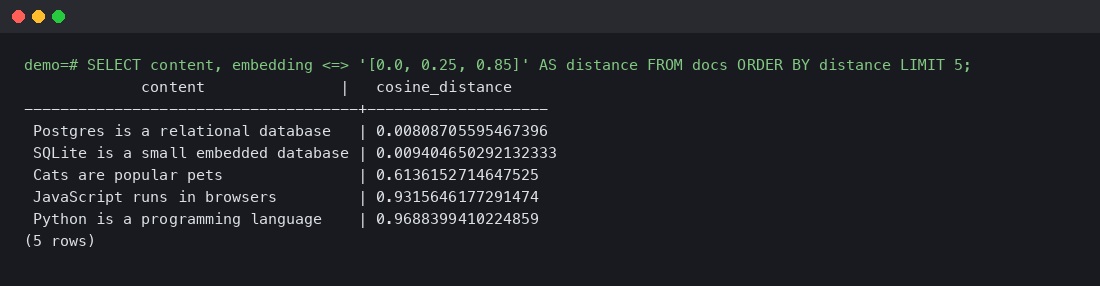
Real query output from a tiny demo corpus running against pgvector/pgvector:pg16:
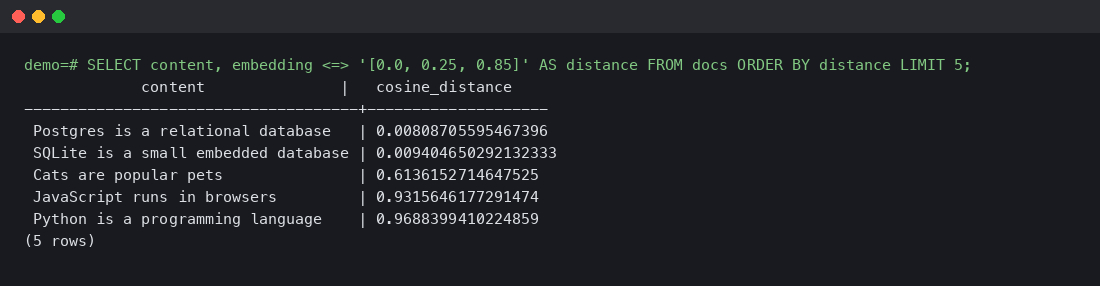
The query was for the embedding of a database-related concept, and the two database documents (Postgres and SQLite) ranked first with very low distances (~0.008-0.009), while the unrelated documents ranked far behind. This is exactly what you want: high signal between similar topics, clear separation from irrelevant ones.
Generation with a local LLM
The last step is feeding the retrieved documents to an LLM and asking it to answer. The prompt template is straightforward:
You are a helpful assistant. Answer the user's question using only the
information in the context below. If the context doesn't contain the
answer, say so.

Context:
{retrieved_documents}

Question: {user_query}

Answer:
Run this against a local Llama 3.1 70B served by vLLM or Ollama, and you have a complete on-prem RAG pipeline. The OpenAI-compatible API means the client code looks like this:
from openai import OpenAI
client = OpenAI(base_url='http://localhost:11434/v1', api_key='ollama')

response = client.chat.completions.create(
    model='llama3.1:70b',
    messages=[
        {'role': 'system', 'content': system_prompt},
        {'role': 'user', 'content': user_message},
    ],
)
The base_url change is the only difference from a hosted-OpenAI client. Everything else — streaming, function calling, JSON mode — works the same in vLLM and recent Ollama versions.
Performance and scaling
Approximate numbers for the pieces:
- Embedding throughput: bge-large-en on a single A100 does ~2000 documents per second batched. On a CPU-only setup, expect 50-100 per second.
- pgvector retrieval latency: sub-10ms for an HNSW index on a million vectors with default settings. Tunable from there.
- LLM generation: Llama 3.1 8B on a 4090 generates ~50-80 tokens/second. The 70B variant on an A100 generates ~15-25 tokens/second. Larger models are slower but produce noticeably better answers for complex questions.
For a real production workload of 10 RAG queries per second, the bottleneck is almost always the LLM generation step. Embedding and retrieval are basically free at that scale.
On-prem RAG with pgvector and a local LLM is no longer the niche choice it was two years ago. Postgres + pgvector is fast enough, open-weight LLMs are good enough for retrieval-augmented generation, and the entire pipeline runs without sending data to an external API. The architecture is straightforward — embed, store, retrieve, generate — and the code that ties it together is a few hundred lines of Python plus a few SQL statements. For projects where data sovereignty matters or where the per-token costs of a hosted API would be prohibitive, the on-prem path is now the right default.
[{“@context”:”https://schema.org”,”@type”:”TechArticle”,”headline”:”Building a RAG Pipeline with pgvector and a Local LLM: A Walkthrough That Actually Works On-Prem”,”description”:”Most RAG (retrieval-augmented generation) tutorials in 2024-2025 assumed you’d ship documents to OpenAI for embeddings, store the vectors in Pinecone or Weaviate, and call GPT-4 for generation. By 2026 the on-prem story has gotten dramatically better: Postgres with pgvector is fast enough for most w…”,”datePublished”:”2026-04-09T00:39:58.909928″,”dateModified”:”2026-04-09T00:39:58.909928″,”author”:{“@type”:”Person”,”name”:”Staff Writer”},”publisher”:{“@type”:”Organization”,”name”:”blog.findaura.ai”,”url”:”https://blog.findaura.ai”,”logo”:{“@type”:”ImageObject”,”url”:”https://blog.findaura.ai/wp-content/uploads/logo.png”}},”articleBody”:”Most RAG (retrieval-augmented generation) tutorials in 2024-2025 assumed you’d ship documents to OpenAI for embeddings, store the vectors in Pinecone or Weaviate, and call GPT-4 for generation. By 2026 the on-prem story has gotten dramatically better: Postgres with pgvector is fast enough for most workloads, the open-weight LLMs (Llama 3.x, Qwen, Mistral) are good enough for most generation tasks, and you can run the entire pipeline on your own hardware without sending a single token to an external API. This article walks through what that actually looks like, with a real query against pgvector running in docker. Why on-prem RAG is now viable The case for on-prem RAG has always existed — data sovereignty, privacy compliance, cost control, the absence of a per-token bill — but the tooling had to catch up. The pieces that fell into place during 2024-2025: pgvector matured. The Postgres extension that adds vector data types and similarity search went from a hobbyist project to a productio”,”wordCount”:1343,”articleSection”:”Technology”,”inLanguage”:”en-US”,”isAccessibleForFree”:true,”mainEntityOfPage”:{“@type”:”WebPage”,”@id”:”https://blog.findaura.ai/building-a-rag-pipeline-with-pgvector-and-a-local-llm-a-walk”},”keywords”:[“RAG”,”pgvector”,”Llama 3″,”on-prem AI”,”vector search”],”about”:[{“@type”:”Thing”,”name”:”RAG”},{“@type”:”Thing”,”name”:”pgvector”},{“@type”:”Thing”,”name”:”Llama 3″}]}]